Hand menus
A hand menu is a small window that rides on one hand and shows while that hand is raised with the palm toward you, in the manner of the hand menu in MRTK 2 for Unity. It is the fourth dock mode, hand-locked, and everything else about it is an ordinary window: it is opened through the same factory, tracked by the same WindowManager, and its buttons are wired the same way as any other panel.
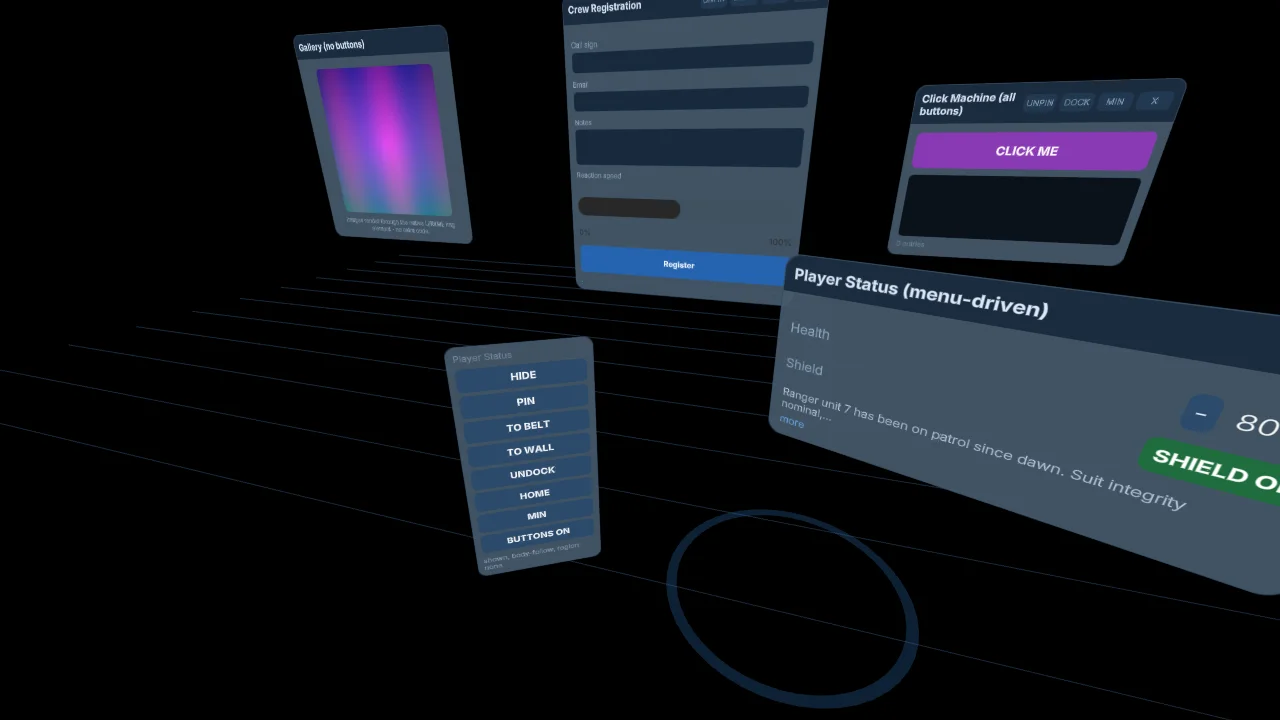
The picture is the showcase's Window Control menu on the desktop build, where there are no hands, so it follows the body instead. On a headset the same window rides the left hand and hides whenever the palm turns away.
Open one
Spawn a window with dockMode: DockMode.HandLocked and a handMenu block. Every option has a default, so the block can be empty; the values below are the defaults written out.
import { DockMode, createSceneHost, registerUIExtensions } from '@realitycollective/iwsdk-uiextensions';

const windows = registerUIExtensions(world);
const host = createSceneHost(world);

const menu = host.createWindow({
  id: 'hand-menu',
  config: './ui/hand-menu.uikitml',
  dockMode: DockMode.HandLocked,
  handMenu: { hand: 'left', anchor: 'above', anchorDistance: 0.12, palmGate: true, palmAngle: 60 },
});
The same options work on the XR Blocks and plain three.js adapter, where the host needs a HandPoseSource: pass xr: renderer.xr to connectUIExtensions, or handPose: webxrHandPoseSource(renderer.xr) to UixWindowHost, and the session's input sources supply the poses.
The handMenu options
| Option | Values | Default | What it does |
|---|---|---|---|
hand | left, right, either | left | Which hand carries the menu. either shows it on whichever tracked palm faces you most. |
anchor | above, inside, outside, wrist | above | Where the panel sits relative to the palm: beyond the fingertips, on the thumb side, on the little-finger side, or back past the wrist. |
anchorDistance | metres | 0.12 | How far from the palm the anchor point is. |
offset | [x, y, z] metres | [0, 0, 0] | An extra hand-local offset added after the anchor. |
palmGate | boolean | true | Show only while the palm faces the viewer. Off means shown whenever the hand is tracked. |
palmAngle | degrees | 60 | The largest angle between the palm normal and the direction to the viewer for the gate to open. |
Anchors are named from the hand's point of view, so a menu reads the same whichever hand carries it. The panel always turns to face the viewer, upright against world up.
The options live on the window record, so they can change at runtime: windows.setHandMenu(id, { hand: 'right' }) updates them and emits handMenuChanged. SceneWindow in a SceneDescriptor takes the same block, which is how the showcase declares its menu as data.
The palm gate
The gate is evaluated every frame from the hand pose and the head pose. While it is shut, the window is neither drawn nor hittable, exactly as if it were hidden: on IWSDK the window system strips the ray and poke interaction tags, and on XR Blocks the host toggles the window's group. hide() still wins over an open gate, so a menu that has been hidden through the manager stays hidden however the hand moves.
The core reads every hand pose in the WebXR grip frame, the one a controller's grip and a tracked hand's gripSpace share, so the palm normal and the anchor offsets mean the same thing on every engine. Hand joint spaces use a different frame and are not used; an adapter that only has joints must convert.
Where there are no hands
A page can serve a desktop and a headset from one scene. Outside a session, or on a device with neither hands nor controllers, the adapter's HandPoseSource.hasHands() reports false and a hand-locked window falls back to body-follow placement at its followOffset, rather than staying hidden. That is what the showcase does on its desktop build, and it is why the picture above shows the menu floating beside the window rather than on a hand.
Reference markup
HAND_MENU_SNIPPET in the core is the reference markup: the same uix-window and uix-content ids as a window, no title bar, and a vertical stack of buttons that sizes to its content. Without a title bar there is nothing to drag, which is what a hand menu wants. Give each button an id and wire it to a WindowManager call.
<div id="uix-window" class="uix-hand-menu">
  <div id="uix-content" class="uix-hand-menu-stack">
    <div id="menu-hide" class="uix-hand-menu-button">HIDE</div>
    <div id="menu-pin" class="uix-hand-menu-button">PIN</div>
    <div id="menu-home" class="uix-hand-menu-button">HOME</div>
    <div id="menu-close" class="uix-hand-menu-button">CLOSE</div>
  </div>
</div>
menu.onReady((panel) => {
  const on = (id: string, action: () => void) =>
    panel.getElementById(id)?.addEventListener('click', action);
  on('menu-hide', () => windows.toggleHidden('status'));
  on('menu-pin', () => windows.togglePin('status'));
  on('menu-home', () => windows.returnHome('status'));
  on('menu-close', () => windows.close('status'));
});
Because a hand menu drives a window through the manager, the target window needs no title-bar buttons of its own. The shipped basic-window example spawns its window with none and puts hide, pin, home, minimise, buttons-on and close on the menu, reading each label back from the record so it always names the next action.
Pinning and dragging a hand menu
Pinning or dragging a hand menu lands it world-locked where it was, the same rule as for a head-locked window: pinning something to the hand or the face in place makes it an ordinary window. togglePin on a hand-locked window therefore moves it to world-locked, and returnHome on the window it drives is the way to put a target back where it spawned.